If you just placed an order but haven't received your email confirmation or download links, don't panic!
While our system sends emails instantly, sometimes technology hiccups. Emails can land in your Spam or Promotions folder, or occasionally they are blocked entirely by email providers.
The good news is that you do not need the email to get your files. You can access everything you bought directly from our shop at any time.
How to find your downloads immediately:
Log in to your account on the Digital Artistry shop.
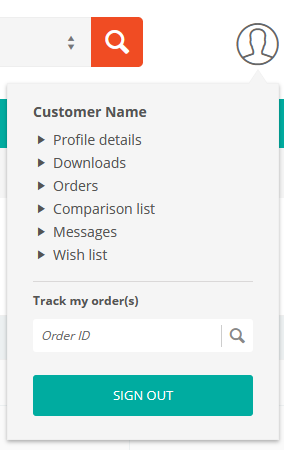
Go to My Account (click the profile icon at the top right of the page) and select Orders.
Find your recent order in the list and click on the Order ID number (or "View").
Look for the Downloads tab or the download links listed next to each product (you can also go directly to downloads from the My Account menu).
Click the link to save the file to your computer.
Still having trouble? If you don't see the order in your history, it is possible you may have checked out as a "Guest" or there was a typo in your email address during registration. Please contact support with your name and approximately when you ordered, and we will get it sorted out for you!
Was this article helpful?
That’s Great!
Thank you for your feedback
Sorry! We couldn't be helpful
Thank you for your feedback
Feedback sent
We appreciate your effort and will try to fix the article